
Explore translation features
Read webpages in two languages without losing the original
Read foreign-language articles, technical documentation and discussions with the original text still in view. Start translation when you need it, compare paragraphs and restore the original page at any time.
A free usage allowance is available. Translation requires sign-in and internet access; usage limits apply.
How to use it
- Install the extension, sign in and select a target language.
- Open a readable webpage and start page translation from the extension.
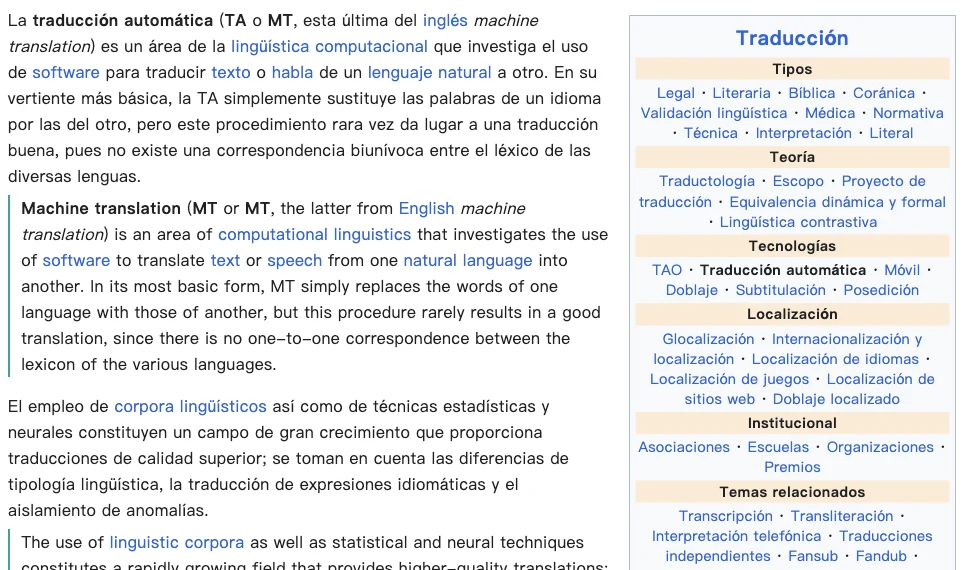
- Use bilingual mode to compare paragraphs, or switch to translated text when you prefer.
- Restore the original, or select a difficult passage for a contextual explanation.
A reading workflow for longer pages
Begin with the introduction and headings to establish the topic. Compare unfamiliar passages in bilingual mode rather than copying a whole article into another tool. Links and the surrounding page remain available, so you can follow references as you read.
Control when translation starts
Translation starts with your action by default. Automatic translation and page controls can be enabled separately. Merely displaying a floating button does not translate the page. You can restrict website access in your browser’s extension settings; restricted sites may require you to restore access before translation works.
Know the boundaries
The extension translates accessible webpage text. Browser-internal pages, text inside images and some unusual or protected layouts cannot be treated like ordinary articles. Dynamic sites may change after translation. Review the visible result and restore the original when needed. Translation needs an account, network access and allowance; no personal model API key is required.
A free usage allowance is available. Translation requires sign-in and internet access; usage limits apply.