
Explore translation features
Understand a phrase in the context where you found it
A short phrase can mean different things in a paper, a conversation or a tutorial. Select the passage you are reading to request translation and an explanation with the relevant context.
A free usage allowance is available. Translation requires sign-in and internet access; usage limits apply.
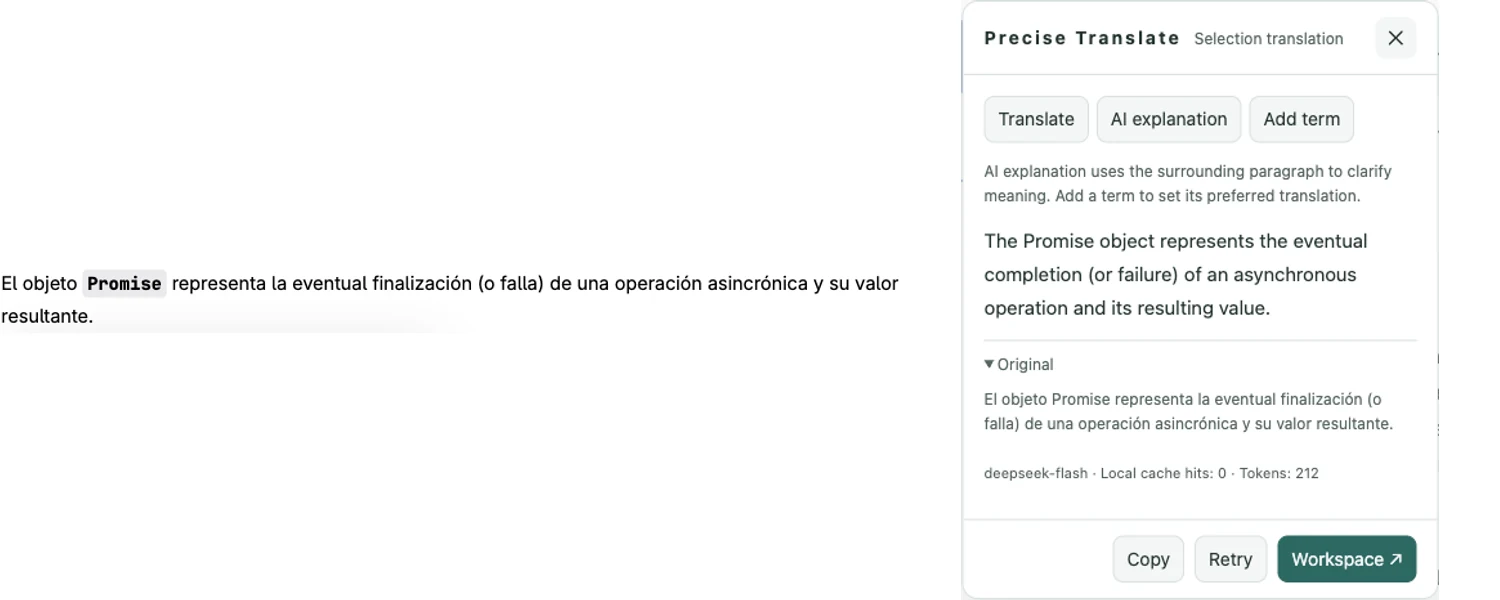
How to use it
- Install the extension and sign in. Open a supported webpage.
- Select the word, sentence or passage you want to understand.
- Use the selection translation or explanation control and choose the target language.
- Compare the explanation with the surrounding text. Add a recurring specialist expression to your glossary if useful.
Give a phrase enough context
Select a complete sentence when a word has more than one meaning. Relevant headings, adjacent passages or nearby captions may be used to clarify the request. Context helps interpretation, but it does not make the generated answer authoritative.
Use explanation for understanding
An explanation can help unpack an idiom or a compressed technical statement. Check names, negation and conditions against the original. For important material, follow the source’s references instead of treating a generated explanation as evidence.
Choose what you share
Selected text, necessary context and matching glossary entries may be sent to the translation service. Avoid including sensitive material you do not intend to process. The feature requires internet access, an account and available allowance. It does not search your browser history.
A free usage allowance is available. Translation requires sign-in and internet access; usage limits apply.